Show some statistics of the enclosed geometric object with psydat file
[1]:
import warnings

import ipywidgets as widgets
import matplotlib.pyplot as plt
import numpy as np
from ipywidgets import interact
from scipy.signal import savgol_filter

import vstt
from vstt.stats import get_velocity
/home/docs/checkouts/readthedocs.org/user_builds/vstt/envs/stable/lib/python3.11/site-packages/psychopy/preferences/preferences.py:11: UserWarning: pkg_resources is deprecated as an API. See https://setuptools.pypa.io/en/latest/pkg_resources.html. The pkg_resources package is slated for removal as early as 2025-11-30. Refrain from using this package or pin to Setuptools<81.
  from pkg_resources import parse_version
pygame 2.6.1 (SDL 2.28.4, Python 3.11.12)
Hello from the pygame community. https://www.pygame.org/contribute.html
Import
A psydat file can be imported using the psychopy fromFile function: If you want to know the detailed content of the data in psydat file, please check the notebook ‘raw_data.ipynb’
[2]:
experiment = vstt.Experiment("example.psydat")
stats = experiment.stats
WARNING:root:Key 'turn_target_to_green_when_reached' missing, using default 'False'
WARNING:root:Key 'turn_target_to_green_when_reached' missing, using default 'False'
WARNING:root:Key 'area' missing, using default 'False'
WARNING:root:Key 'normalized_area' missing, using default 'False'
WARNING:root:Key 'peak_velocity' missing, using default 'False'
WARNING:root:Key 'peak_acceleration' missing, using default 'False'
WARNING:root:Key 'to_target_spatial_error' missing, using default 'False'
WARNING:root:Key 'to_center_spatial_error' missing, using default 'False'
WARNING:root:Key 'movement_time_at_peak_velocity' missing, using default 'False'
WARNING:root:Key 'total_time_at_peak_velocity' missing, using default 'False'
WARNING:root:Key 'movement_distance_at_peak_velocity' missing, using default 'False'
WARNING:root:Key 'rmse_movement_at_peak_velocity' missing, using default 'False'
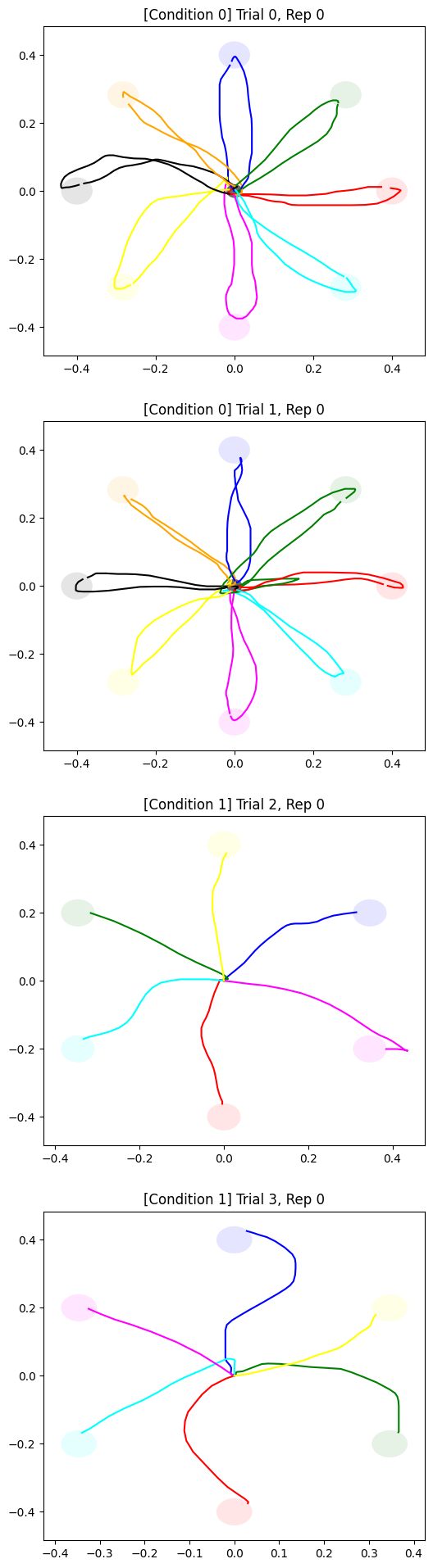
Plot of results for each trial
For example, a scatter plot of the mouse positions for each trial, labelled by the condition, trial number and repetition number:
[3]:
def plot_to_target(ax, group, colors):
    for target_pos, target_radius, positions, color in zip(
        group.target_pos, group.target_radius, group.to_target_mouse_positions, colors
    ):
        ax.plot(positions[:, 0], positions[:, 1], color=color)
        ax.add_patch(
            plt.Circle(
                target_pos,
                target_radius,
                edgecolor="none",
                facecolor=color,
                alpha=0.1,
            )
        )


def plot_to_center(ax, group, colors):
    for central_target_radius, positions, color in zip(
        group.center_radius,
        group.to_center_mouse_positions,
        colors,
    ):
        ax.plot(positions[:, 0], positions[:, 1], color=color)
        ax.add_patch(
            plt.Circle(
                [0, 0],
                central_target_radius,
                edgecolor="none",
                facecolor="black",
                alpha=0.1,
            )
        )


def concatenate(array1, array2):
    return np.concatenate(
        (
            array1,
            array2,
        ),
        axis=0,
    )
[4]:
colors = ["blue", "green", "red", "cyan", "magenta", "yellow", "black", "orange"]

nTrials = len(stats["i_trial"].unique())
nReps = len(stats["i_rep"].unique())
fig, axs = plt.subplots(nTrials, nReps, figsize=(6, 6 * nTrials * nReps))
axs = np.reshape(
    axs, (nTrials, nReps)
)  # ensure axs is a 2d-array even if nTrials or nReps is 1
for (trial, rep, condition_index), group in stats.groupby(
    ["i_trial", "i_rep", "condition_index"]
):
    ax = axs[trial, rep]
    ax.set_title(f"[Condition {condition_index}] Trial {trial}, Rep {rep}")
    plot_to_target(ax, group, colors)
    if not experiment.trial_list[condition_index]["automove_cursor_to_center"]:
        plot_to_center(ax, group, colors)

plt.show()
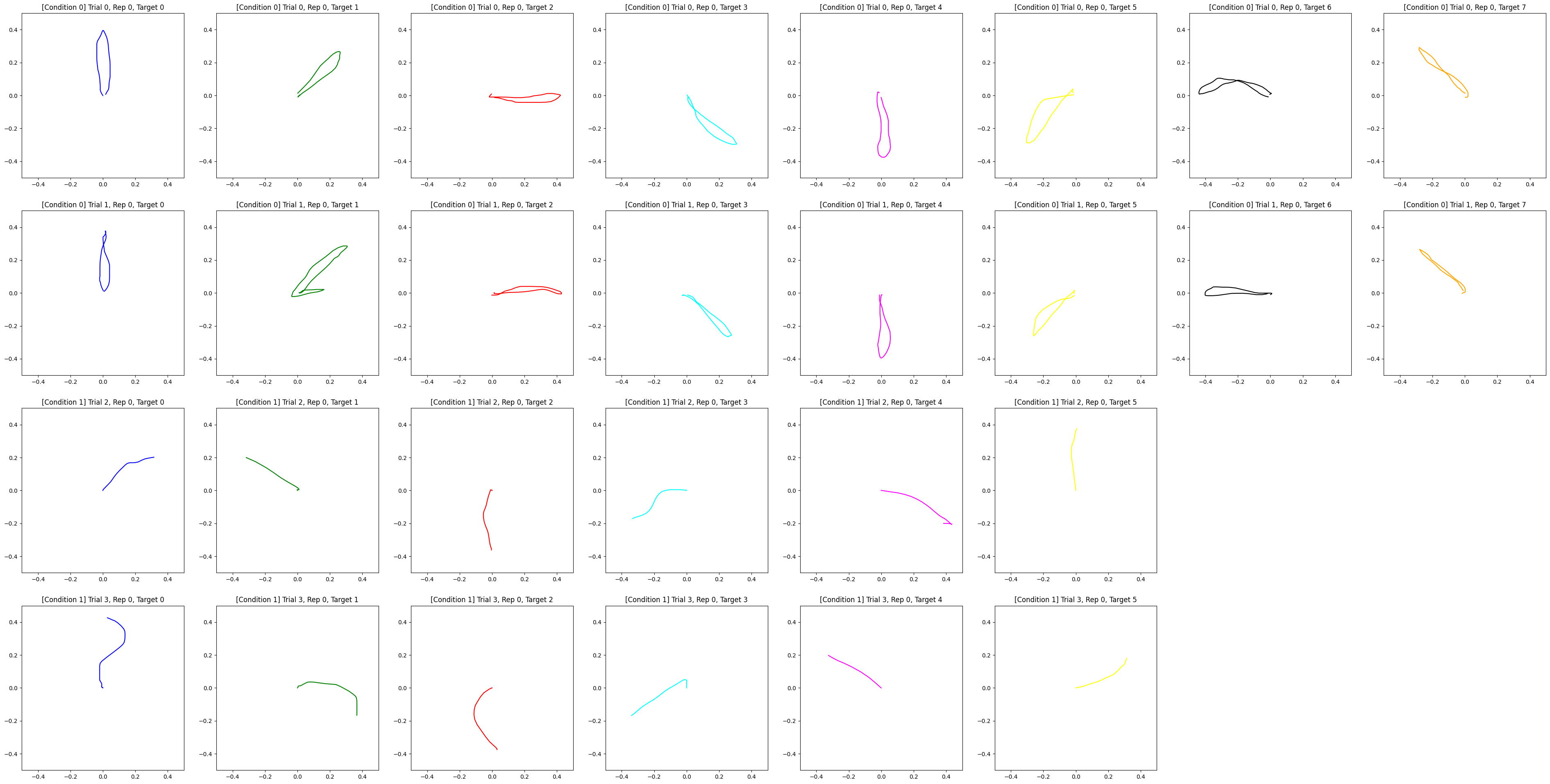
Plot of results for each target
For example, a scatter plot of the mouse positions for each target, labelled by trial number, repetition number, target number and condition:
[5]:
fig, axs = plt.subplots(nTrials, nReps * 8, figsize=(6 * 8, 6 * nTrials * nReps))
axs = np.reshape(
    axs, (nTrials, nReps * 8)
)  # ensure axs is a 2d-array even if nTrials or nReps is 1
for (trial, rep, condition_index), group in stats.groupby(
    ["i_trial", "i_rep", "condition_index"]
):
    for positions, color, i in zip(
        group.to_target_mouse_positions, colors, range(len(group))
    ):
        ax = axs[(trial, rep + i)]
        ax.set_title(
            f"[Condition {condition_index}] Trial {trial}, Rep {rep}, Target {i}"
        )
        ax.set_xlim(-0.5, 0.5)
        ax.set_ylim(-0.5, 0.5)
        if not experiment.trial_list[condition_index]["automove_cursor_to_center"]:
            positions = concatenate(positions, group.to_center_mouse_positions.iloc[i])
        ax.plot(positions[:, 0], positions[:, 1], color=color)

fig.delaxes(axs[2][6])
fig.delaxes(axs[2][7])
fig.delaxes(axs[3][6])
fig.delaxes(axs[3][7])
plt.show()
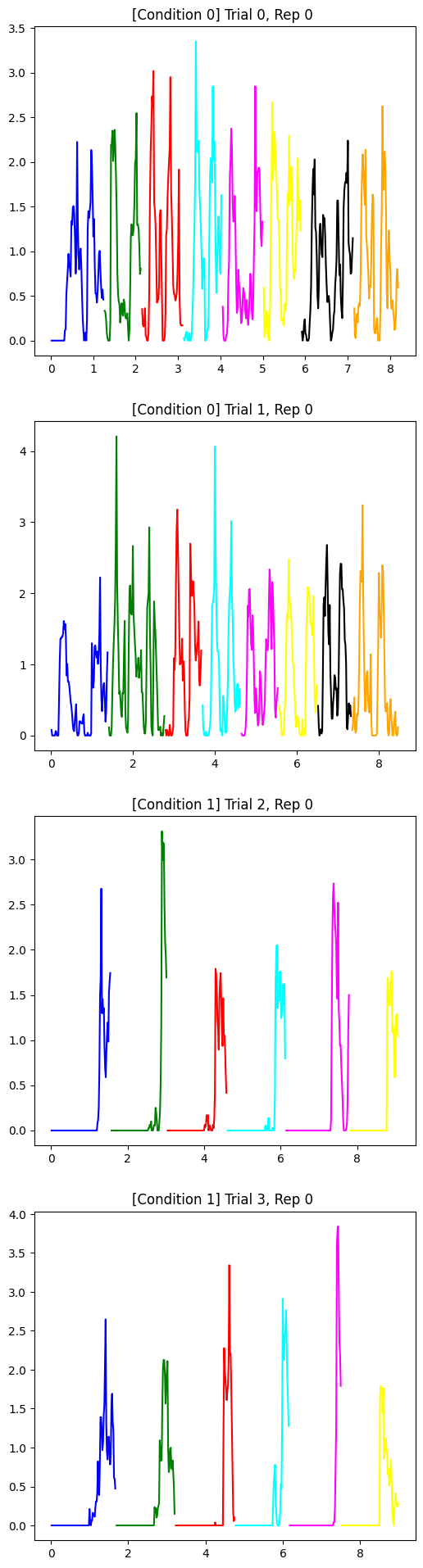
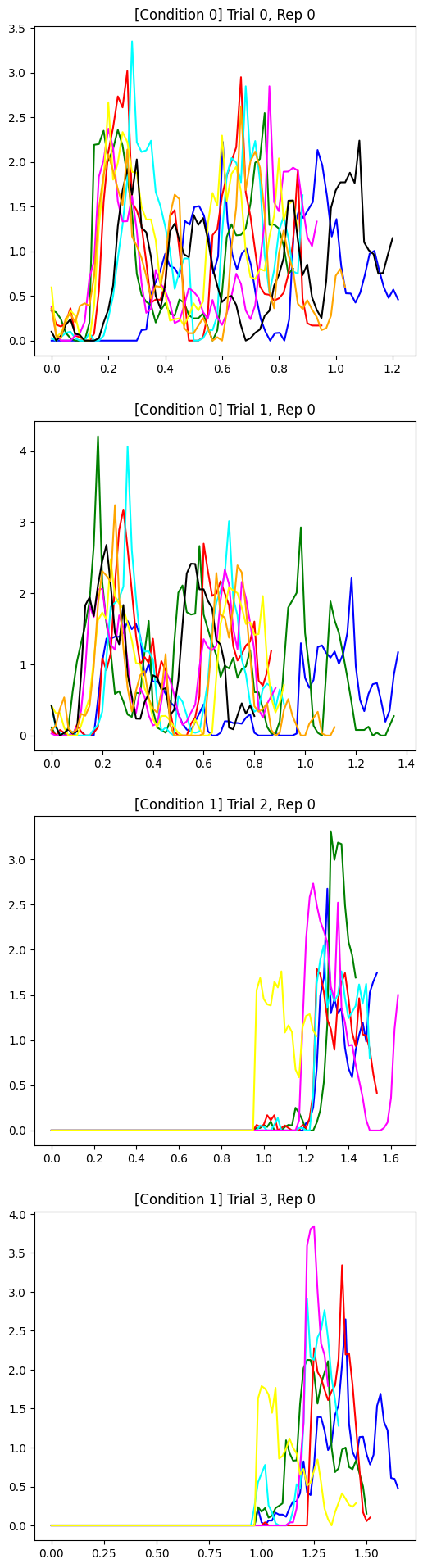
Plot velocity for each trial
For example, a scatter plot of the velocity for each target,displayed in a single plot with velocities shown in the time sequence, labelled by trial number, repetition number and condition:
[6]:
fig, axs = plt.subplots(nTrials, nReps, figsize=(6, 6 * nTrials * nReps))
axs = np.reshape(
    axs, (nTrials, nReps)
)  # ensure axs is a 2d-array even if nTrials or nReps is 1
for (trial, rep, condition_index), group in stats.groupby(
    ["i_trial", "i_rep", "condition_index"]
):
    ax = axs[trial, rep]
    ax.set_title(f"[Condition {condition_index}] Trial {trial}, Rep {rep} ")
    for positions, timestamps, color, i in zip(
        group.to_target_mouse_positions,
        group.to_target_timestamps,
        colors,
        range(len(group)),
    ):
        if not experiment.trial_list[condition_index]["automove_cursor_to_center"]:
            positions = concatenate(positions, group.to_center_mouse_positions.iloc[i])
            timestamps = concatenate(timestamps, group.to_center_timestamps.iloc[i])
        ax.plot(timestamps[:-1], get_velocity(timestamps, positions), color=color)

plt.show()
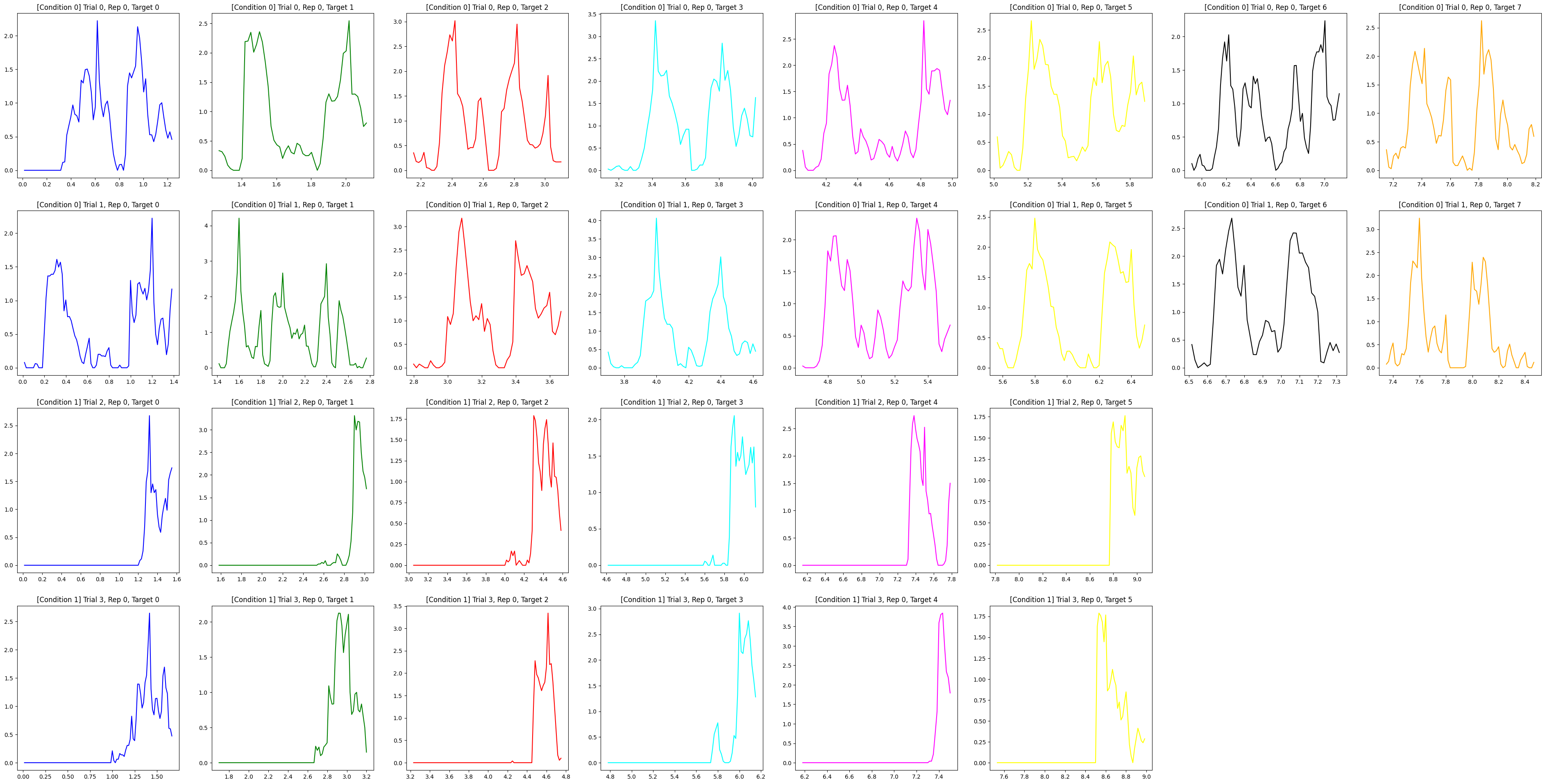
For example, a scatter plot of the velocity for each target in separate plot, labelled by trial number, repetition number and condition:
[7]:
fig, axs = plt.subplots(nTrials, nReps * 8, figsize=(6 * 8, 6 * nTrials * nReps))
axs = np.reshape(
    axs, (nTrials, nReps * 8)
)  # ensure axs is a 2d-array even if nTrials or nReps is 1
for (trial, rep, condition_index), group in stats.groupby(
    ["i_trial", "i_rep", "condition_index"]
):
    for positions, timestamps, color, i in zip(
        group.to_target_mouse_positions,
        group.to_target_timestamps,
        colors,
        range(len(group)),
    ):
        ax = axs[(trial, rep + i)]
        ax.set_title(
            f"[Condition {condition_index}] Trial {trial}, Rep {rep}, Target {i}"
        )
        if not experiment.trial_list[condition_index]["automove_cursor_to_center"]:
            positions = concatenate(positions, group.to_center_mouse_positions.iloc[i])
            timestamps = concatenate(timestamps, group.to_center_timestamps.iloc[i])
        ax.plot(timestamps[:-1], get_velocity(timestamps, positions), color=color)


fig.delaxes(axs[2][6])
fig.delaxes(axs[2][7])
fig.delaxes(axs[3][6])
fig.delaxes(axs[3][7])
plt.show()
For example, a scatter plot of the velocity for each target,displayed in a single plot with velocities starting from the same time point 0,labelled by trial number, repetition number and condition:
[8]:
fig, axs = plt.subplots(nTrials, nReps, figsize=(6, 6 * nTrials * nReps))
axs = np.reshape(
    axs, (nTrials, nReps)
)  # ensure axs is a 2d-array even if nTrials or nReps is 1
for (trial, rep, condition_index), group in stats.groupby(
    ["i_trial", "i_rep", "condition_index"]
):
    ax = axs[trial, rep]
    ax.set_title(f"[Condition {condition_index}] Trial {trial}, Rep {rep}")
    for positions, timestamps, color, i in zip(
        group.to_target_mouse_positions,
        group.to_target_timestamps,
        colors,
        range(len(group)),
    ):
        if not experiment.trial_list[condition_index]["automove_cursor_to_center"]:
            positions = concatenate(positions, group.to_center_mouse_positions.iloc[i])
            timestamps = concatenate(timestamps, group.to_center_timestamps.iloc[i])
        ax.plot(
            timestamps[:-1] - timestamps[0],
            get_velocity(timestamps, positions),
            color=color,
        )

plt.show()
apply a Savitzky-Golay filter example
Here is an example for illustrating how to apply a Savitzky-Golay filter to the velocity
[9]:
def plot_filter(window_length, polyorder):
    """
    plot the original function and filtered function
    :param window_length: The length of the filter window (i.e., the number of coefficients). If mode is ‘interp’, window_length must be less than or equal to the size of x.
    :param polyorder: The order of the polynomial used to fit the samples. polyorder must be less than window_length.
    """
    for _, group in stats.groupby(["i_trial", "i_rep", "condition_index"]):
        for positions, timestamps in zip(
            group.to_target_mouse_positions,
            group.to_target_timestamps,
        ):
            velocity = get_velocity(timestamps, positions)
            plt.plot(timestamps[:-1], velocity, linestyle="dashed")
            filtered_velocity = savgol_filter(velocity, window_length, polyorder)
            plt.plot(timestamps[:-1], filtered_velocity)
            break
        break
    plt.legend(["original velocity", "filtered velocity"], loc="upper left")
    plt.show()


interact(
    plot_filter,
    window_length=widgets.IntSlider(min=1, max=40, step=1, value=40),
    polyorder=widgets.IntSlider(min=1, max=40, step=1, value=8),
);
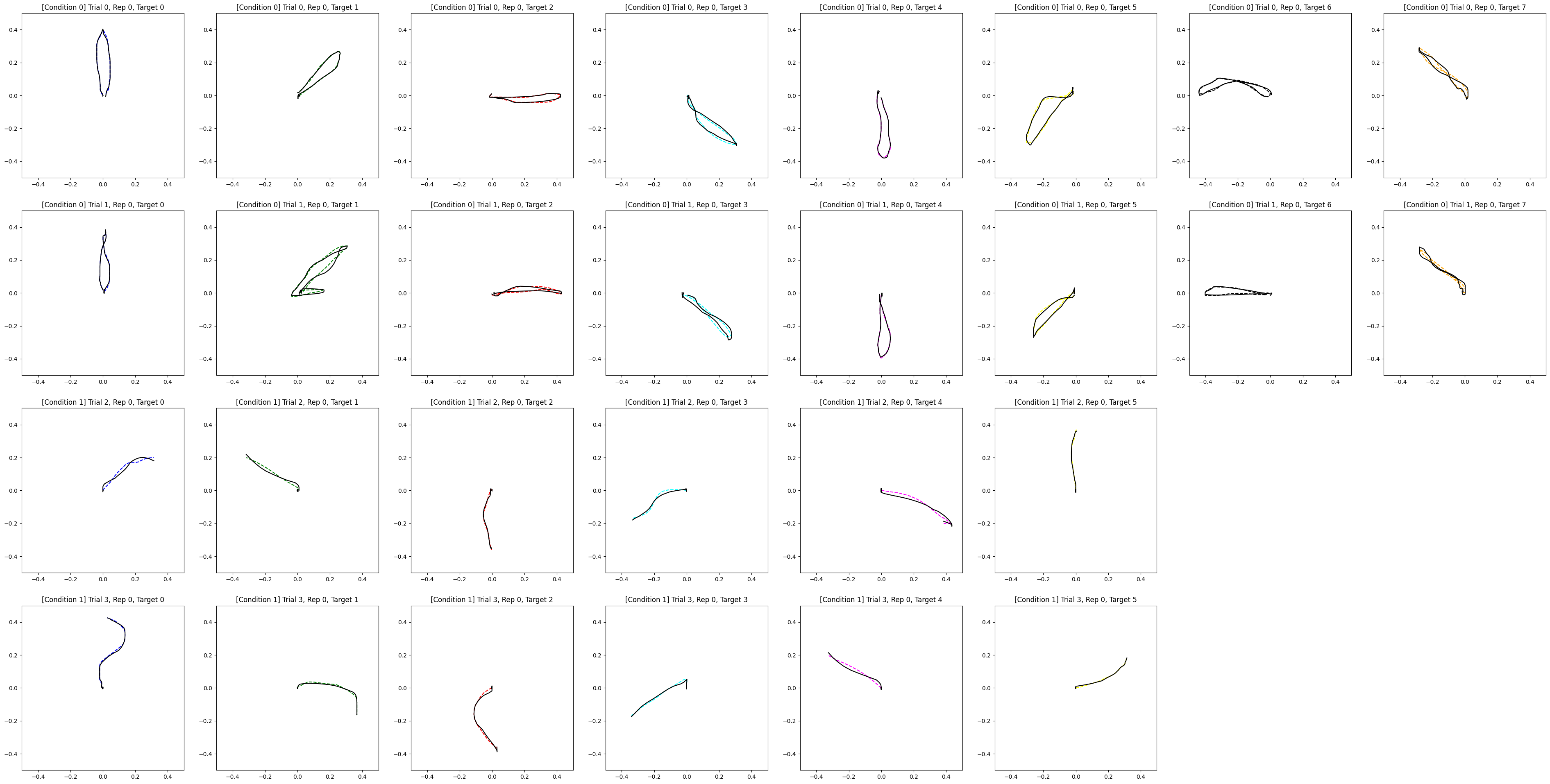
apply filter to the mouse positions
For example, a scatter plot of the movement for each target in separate plots, the filtered movement is displayed in black dashed line:
[10]:
fig, axs = plt.subplots(nTrials, nReps * 8, figsize=(6 * 8, 6 * nTrials * nReps))
axs = np.reshape(
    axs, (nTrials, nReps * 8)
)  # ensure axs is a 2d-array even if nTrials or nReps is 1
for (trial, rep, condition_index), group in stats.groupby(
    ["i_trial", "i_rep", "condition_index"]
):
    for positions, color, i in zip(
        group.to_target_mouse_positions, colors, range(len(group))
    ):
        ax = axs[(trial, rep + i)]
        ax.set_title(
            f"[Condition {condition_index}] Trial {trial}, Rep {rep}, Target {i}"
        )
        ax.set_xlim(-0.5, 0.5)
        ax.set_ylim(-0.5, 0.5)
        if not experiment.trial_list[condition_index]["automove_cursor_to_center"]:
            positions = concatenate(positions, group.to_center_mouse_positions.iloc[i])
        ax.plot(positions[:, 0], positions[:, 1], color=color, linestyle="dashed")
        window_length = len(positions[:, 0])
        polyorder = 8
        filtered_y = savgol_filter(positions[:, 1], window_length, polyorder)
        ax.plot(positions[:, 0], filtered_y, color="black")


fig.delaxes(axs[2][6])
fig.delaxes(axs[2][7])
fig.delaxes(axs[3][6])
fig.delaxes(axs[3][7])
plt.show()
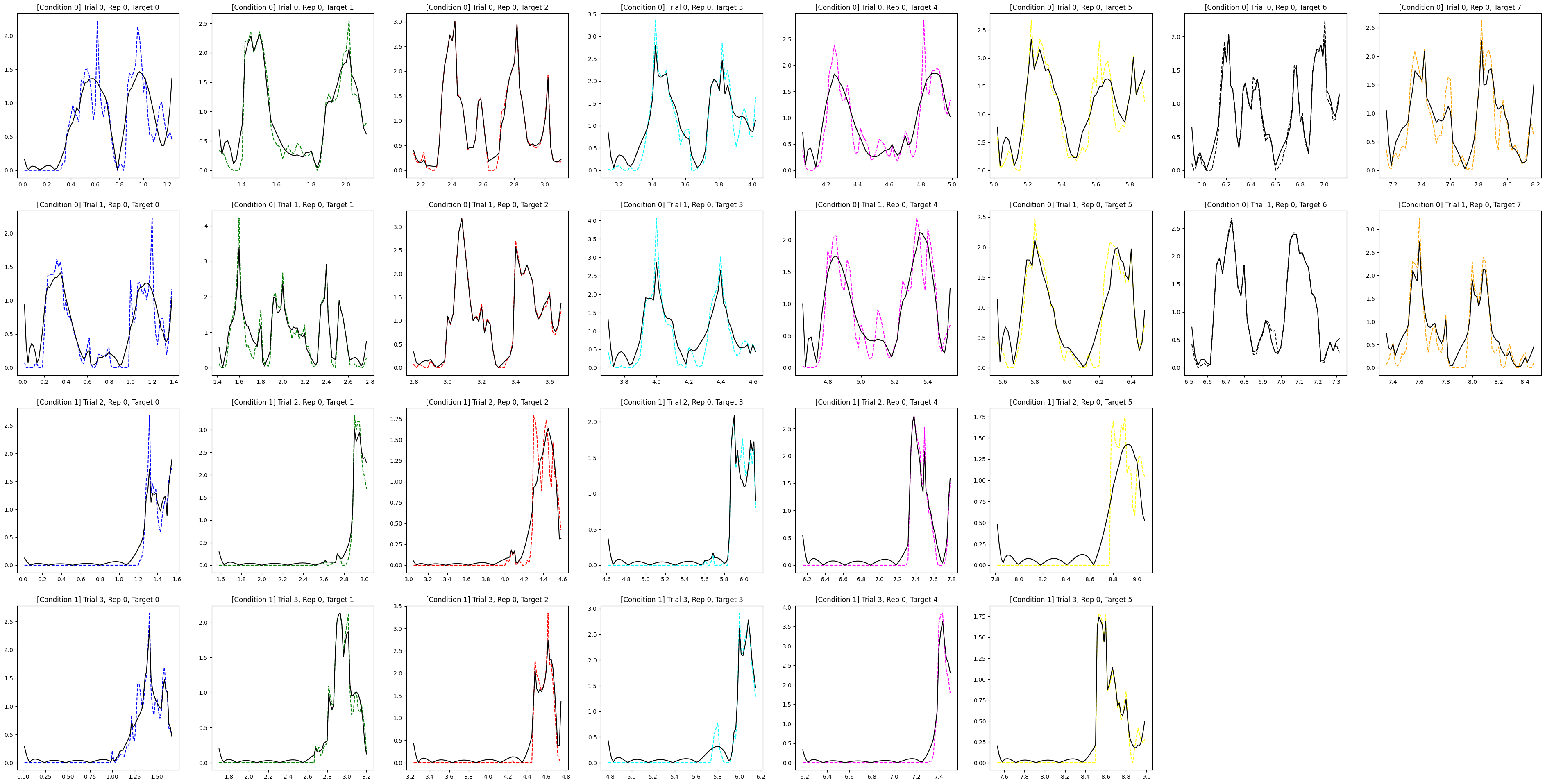
apply filter to the mouse position first, then plot the velocity
For example, a scatter plot of the velocity for each target in separate plots, the filtered velocity is displayed in black dashed line:
[11]:
fig, axs = plt.subplots(nTrials, nReps * 8, figsize=(6 * 8, 6 * nTrials * nReps))
axs = np.reshape(
    axs, (nTrials, nReps * 8)
)  # ensure axs is a 2d-array even if nTrials or nReps is 1
for (trial, rep, condition_index), group in stats.groupby(
    ["i_trial", "i_rep", "condition_index"]
):
    for positions, timestamps, color, i in zip(
        group.to_target_mouse_positions,
        group.to_target_timestamps,
        colors,
        range(len(group)),
    ):
        ax = axs[(trial, rep + i)]
        ax.set_title(
            f"[Condition {condition_index}] Trial {trial}, Rep {rep}, Target {i}"
        )
        if not experiment.trial_list[condition_index]["automove_cursor_to_center"]:
            positions = concatenate(positions, group.to_center_mouse_positions.iloc[i])
            timestamps = concatenate(timestamps, group.to_center_timestamps.iloc[i])
        velocity = get_velocity(timestamps, positions)
        ax.plot(timestamps[:-1], velocity, color=color, linestyle="dashed")
        filtered_positions = positions.copy()
        window_length = len(filtered_positions[:, 1])
        polyorder = 8
        filtered_positions[:, 1] = savgol_filter(
            filtered_positions[:, 1], window_length, polyorder
        )
        velocity_with_filtered_positions = get_velocity(timestamps, filtered_positions)
        ax.plot(
            timestamps[:-1],
            velocity_with_filtered_positions,
            color="black",
        )

fig.delaxes(axs[2][6])
fig.delaxes(axs[2][7])
fig.delaxes(axs[3][6])
fig.delaxes(axs[3][7])
warnings.filterwarnings("ignore")
plt.show()
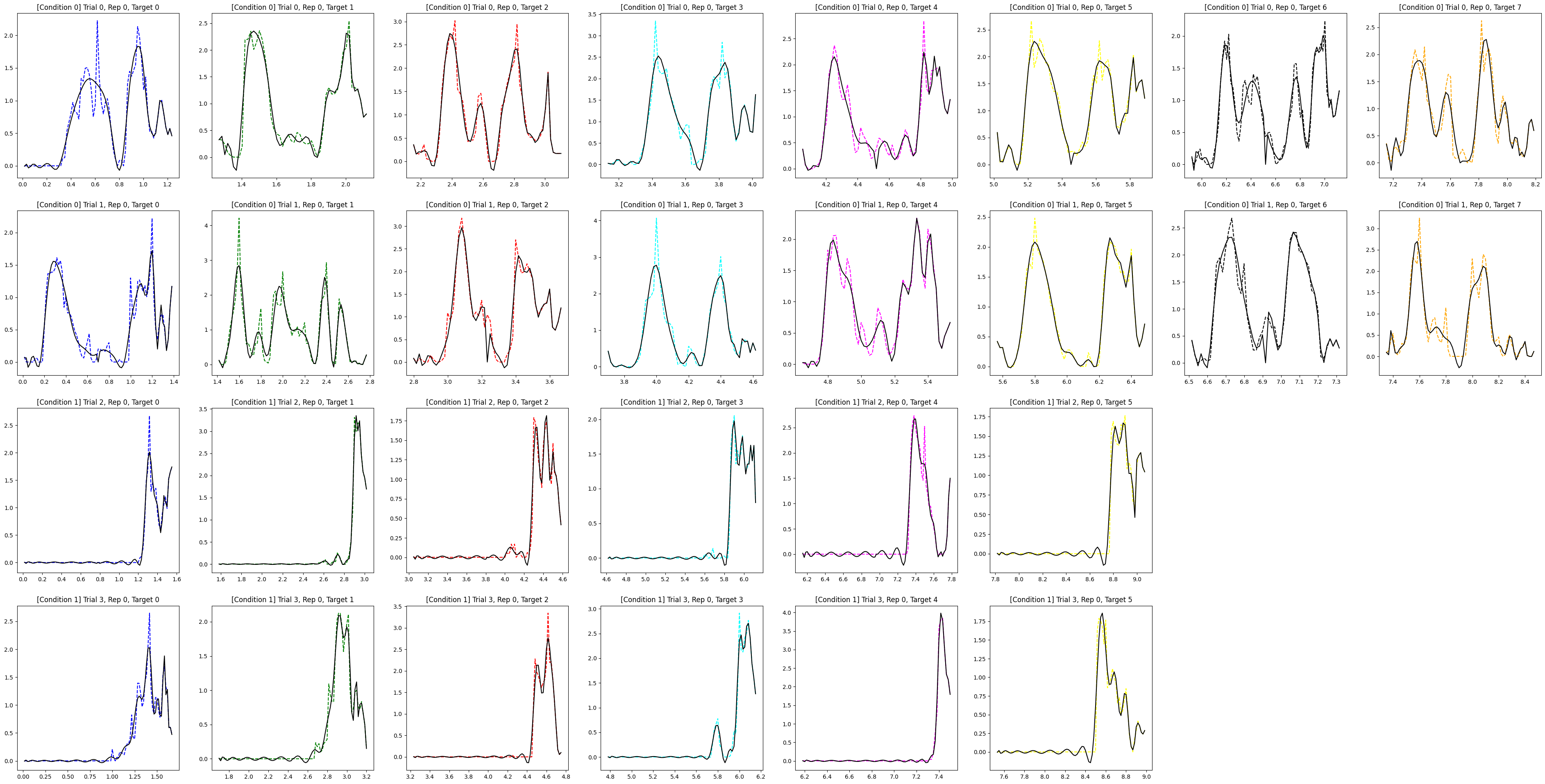
apply filter to the velocity plot to make it smoother
For example, a scatter plot of the velocity for each target in separate plots, the filtered velocity is displayed in black dashed line:
[12]:
fig, axs = plt.subplots(nTrials, nReps * 8, figsize=(6 * 8, 6 * nTrials * nReps))
axs = np.reshape(
    axs, (nTrials, nReps * 8)
)  # ensure axs is a 2d-array even if nTrials or nReps is 1
for (trial, rep, condition_index), group in stats.groupby(
    ["i_trial", "i_rep", "condition_index"]
):
    for positions, timestamps, color, i in zip(
        group.to_target_mouse_positions,
        group.to_target_timestamps,
        colors,
        range(len(group)),
    ):
        ax = axs[(trial, rep + i)]
        ax.set_title(
            f"[Condition {condition_index}] Trial {trial}, Rep {rep}, Target {i}"
        )
        if not experiment.trial_list[condition_index]["automove_cursor_to_center"]:
            positions = concatenate(positions, group.to_center_mouse_positions.iloc[i])
            timestamps = concatenate(timestamps, group.to_center_timestamps.iloc[i])
        velocity = get_velocity(timestamps, positions)
        ax.plot(timestamps[:-1], velocity, color=color, linestyle="dashed")
        window_length = len(velocity)
        polyorder = len(velocity) - 1
        filtered_velocity = savgol_filter(velocity, window_length, polyorder)
        ax.plot(timestamps[:-1], filtered_velocity, color="black")


fig.delaxes(axs[2][6])
fig.delaxes(axs[2][7])
fig.delaxes(axs[3][6])
fig.delaxes(axs[3][7])
warnings.filterwarnings("ignore")
plt.show()
[ ]: